Building a GitHub Action Notifier with n8n (Self-Hosted)
1/9/2026
In this post, I’ll walk through how I built a GitHub Action notification system using self-hosted n8n, and how I send meaningful alerts to our Discord instead of the default notifications.
This setup is ideal if you:
- Self-host your automation tools
- Want full control (no SaaS limits)
- Care about clean, actionable alerts
- Are already using GitHub actions
This blog focuses only on GitHub → n8n → Discord.
🛑 Why not just use GitHub notifications?
GitHub notifications are fine… until they aren’t.
What I ran into:
- Too many emails
- No context
- Hard to filter what’s critical
- No easy way to format messages nicely
- Team not noticing
What I wanted instead:
- Immediate alerts for failures & successes
- Interactive messages
- Different severity levels
- One central place (Discord)
That’s where n8n fits perfectly.
🏗️ Architecture Overview
Here’s the final flow:
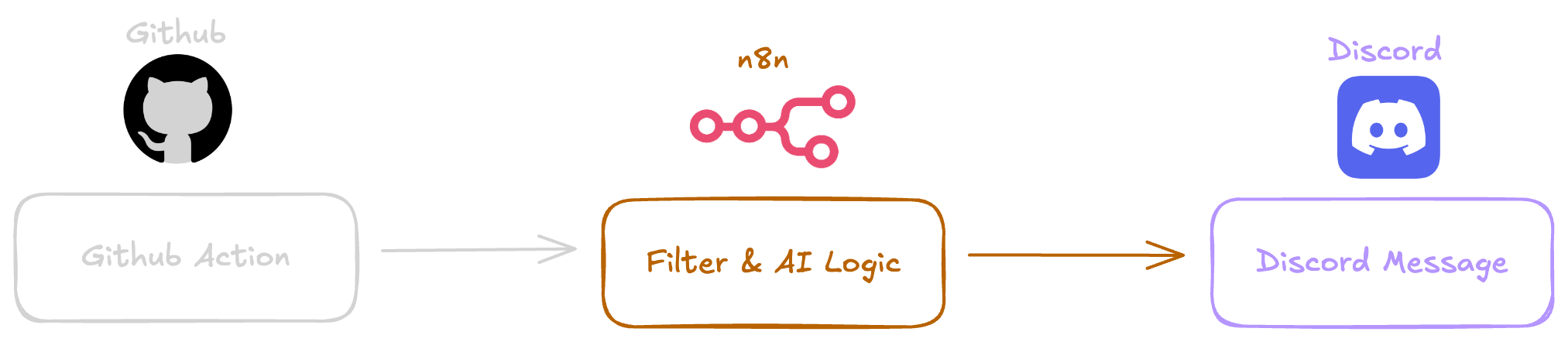
✅ No GitHub apps
✅ No polling
✅ No paid services
⚙️ Prerequisites
Before starting, make sure you have:
- A n8n instance
- A public HTTPS (Recommended) URL for n8n
- A Discord webhook
- A GitHub repository with Actions enabled
⚠️ GitHub requires HTTPS.
🌐 Step 1: Expose n8n via HTTPS
I’m running n8n behind Nginx with Docker in my own VPS.
Things to double-check:
- SSL certificate (Let’s Encrypt)
- WebSocket support
- Reverse proxy headers
- Correct n8n environment variables
🧠 Must-have Nginx config for WebSockets
proxy_set_header Upgrade $http_upgrade;
proxy_set_header Connection "upgrade";
Without this, the n8n UI will randomly show “connection lost”.
🐳 Step 2: n8n Docker Configuration
Here’s the docker-compose.yml I used:
version: "3.3"

services:
  n8n:
    image: n8nio/n8n
    restart: unless-stopped
    ports:
      - "5678:5678"
    environment:
      - N8N_PROTOCOL=https
      - N8N_HOST=n8n.yourdomain.com
      - N8N_EDITOR_BASE_URL=https://n8n.yourdomain.com
      - WEBHOOK_URL=https://n8n.yourdomain.com
      - N8N_TRUST_PROXY=true
      - N8N_PROXY_HOPS=1
      - GENERIC_TIMEZONE=Asia/Tokyo
    volumes:
      - ./n8n_data:/home/node/.n8n
This sets correct base URLs for both UI and webhooks.
📩 Step 3: Create a Webhook in n8n
Inside n8n:
- Add Webhook node
- Method: POST
- Path:
github-action - Save the workflow
Your webhook URL becomes:
https://n8n.yourdomain.com/webhook/github-action
🛠️ Step 4: Connect GitHub to n8n using Webhooks
In the GitHub Repository, configure a Webhook as below.
1️⃣ Go to your GitHub repository
Repository → Settings → Webhooks → Add webhook
2️⃣ Webhook configuration
| Field | Value |
|---|---|
| Payload URL | https://n8n.yourdomain.com/webhook/github-action |
| Content type | application/json |
| Secret | (optional) |
| SSL verification | Enabled |
| Events | Workflow runs |
3️⃣ Save the webhook
GitHub will now POST workflow data to n8n every time a workflow completes.
🧠 What GitHub Sends to n8n
GitHub automatically sends a payload like:
- Repository name
- Workflow name
- Branch
- Conclusion (
success,failure) - Run URL
- Commit details
No extra work needed.
🔍 Step 5: Inspect & Normalize the GitHub Payload in n8n
Once GitHub sends data to your webhook, execute the workflow once and inspect the payload.
In the Webhook node output, you’ll see a structure similar to:
{
  "workflow_run": {
    "name": "CI",
    "conclusion": "failure",
    "html_url": "https://github.com/org/repo/actions/runs/123",
    "head_branch": "main"
  },
  "repository": {
    "full_name": "org/repo"
  }
}
Key fields we’ll use:
- workflow_run.name
- workflow_run.conclusion
- workflow_run.html_url
- workflow_run.head_branch
- repository.full_name
This data is enough to build meaningful alerts.
🧠 Step 6: Add Logic (Success vs Failure)
Add an IF node after the Webhook.
IF condition
Check workflow result:
Left value:
{{ $json.workflow_run }}Check whether the workflow_run exists
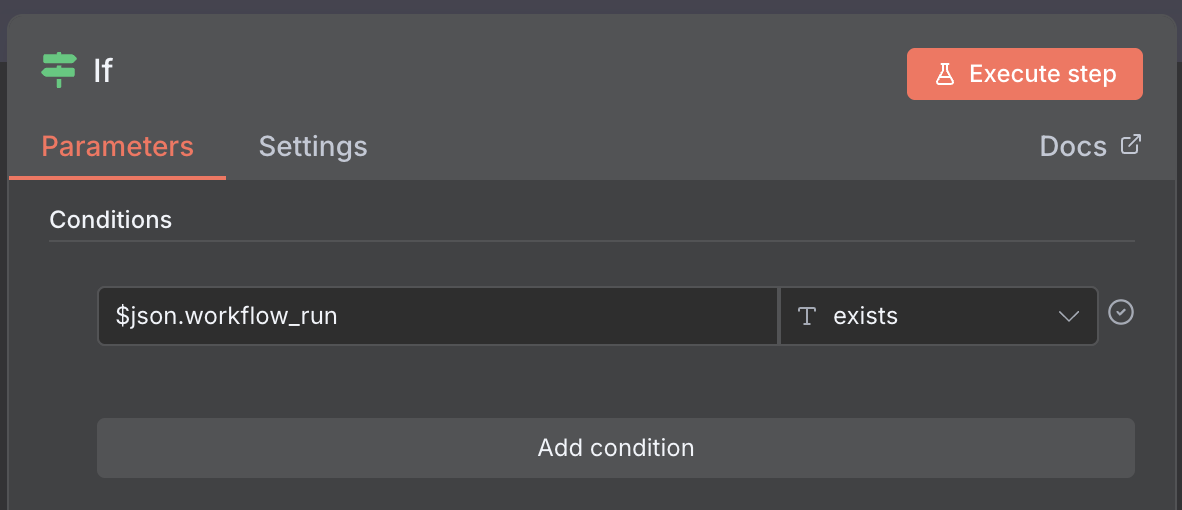
Result paths
TRUE → Next IF Condition
This gives you an error less routing.
🧠 Step 7: Check whether the workflow was completed
Sometimes the alerts from incomplete (cases like manually stopped) actions might also arrive to the n8n workflow.
So I added a condition to check whether the workflow was completed
{{$json.body.workflow_run.status}}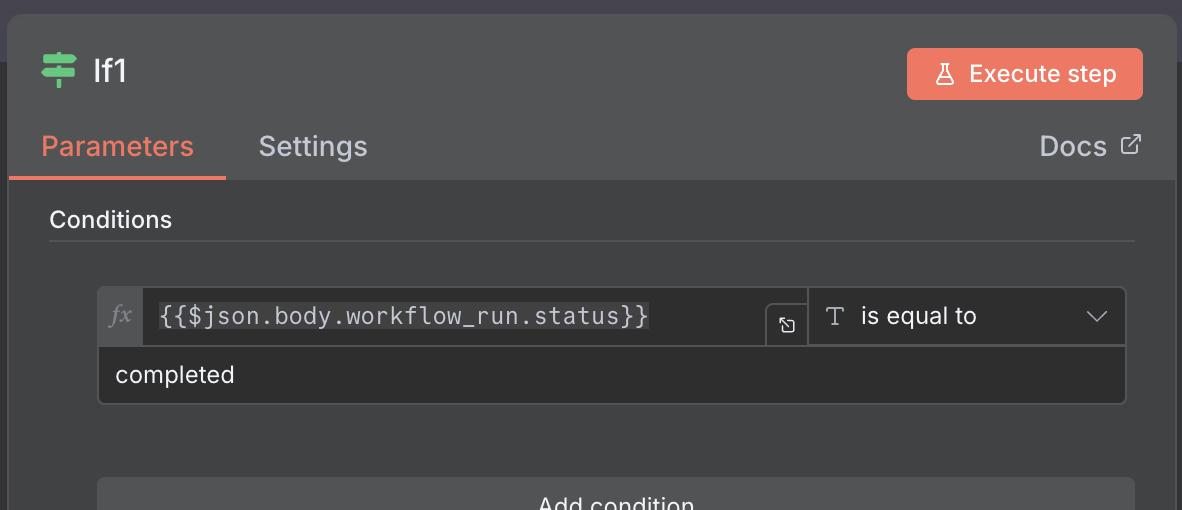
💬 Step 8: Send Alerts to Discord
Instead of using multiple Discord nodes, this workflow uses one Discord node with conditional message formatting.
This keeps the flow:
- Cleaner
- Easier to maintain
- Less visual clutter in n8n
The severity (success vs failure) is handled inside the message itself.
🧩 How It Works
Add one Discord node after your logic/formatting step
Use n8n expressions to dynamically change the message
Emojis + text indicate severity
No branching required.
📝 Discord Message Template
Here’s the exact message format used:
Repository: {{ $json.body.repository.full_name }}
Workflow: {{ $json.body.workflow_run.name }}
Branch: {{ $json.body.workflow_run.head_branch }}

{{
  $json.body.workflow_run.conclusion === 'success'
    ? '✅ Successfully deployed to the ' + $json.body.workflow_run.head_branch + ' environment'
    : '❌ Run Failed'
}}

🔗{{ $json.body.workflow_run.html_url }}
🧩 How the message logic works What This Does
-
Gets all the details from the github action payload
-
Assign the values neccessary for the messsage
-
Check whether the conslusion of the workflow run is success,
-
If success then the success message will be set, else the failed part will be set to the message
🏁 Closing Thoughts
With this setup in place, Now the team gets a clear, real-time GitHub Action notification directly in Discord, without relying on GitHub’s default emails or individual messages.
This workflow has already reduced waiting time on informing changes in the code.
🙌 Let’s Connect
If you’re into futuristic tech, building cool apps, or just curious about life in Japan as a software engineer — follow along!
📸 Instagram
🐦 X / Twitter
🌐 dhaneja.com
Let’s see what the future holds 👓🚀